Interactive results for AI appsEarly designs for editable checklists and journal search.
Building Idyllic - Prior Iterations
August to October 2024
A generated checklist should let you check things off. The model can write the tasks, but the application has to decide what a checkbox changes, where that change lives and what happens when another list appears.
Task Bear gave us a concrete case. A person would describe something they needed to do, and AI would break it into a checklist. I wanted the result to remain useful while they did the work. That meant designing the interaction after generation as carefully as the prompt that generated it.
Turning a request into an interactive result
The Task Bear design had a feed for activity and results, with input controls along the bottom. Those controls could open more detailed interfaces when the app needed information. A shared layout could support several kinds of app, provided each app could define its own inputs and results.
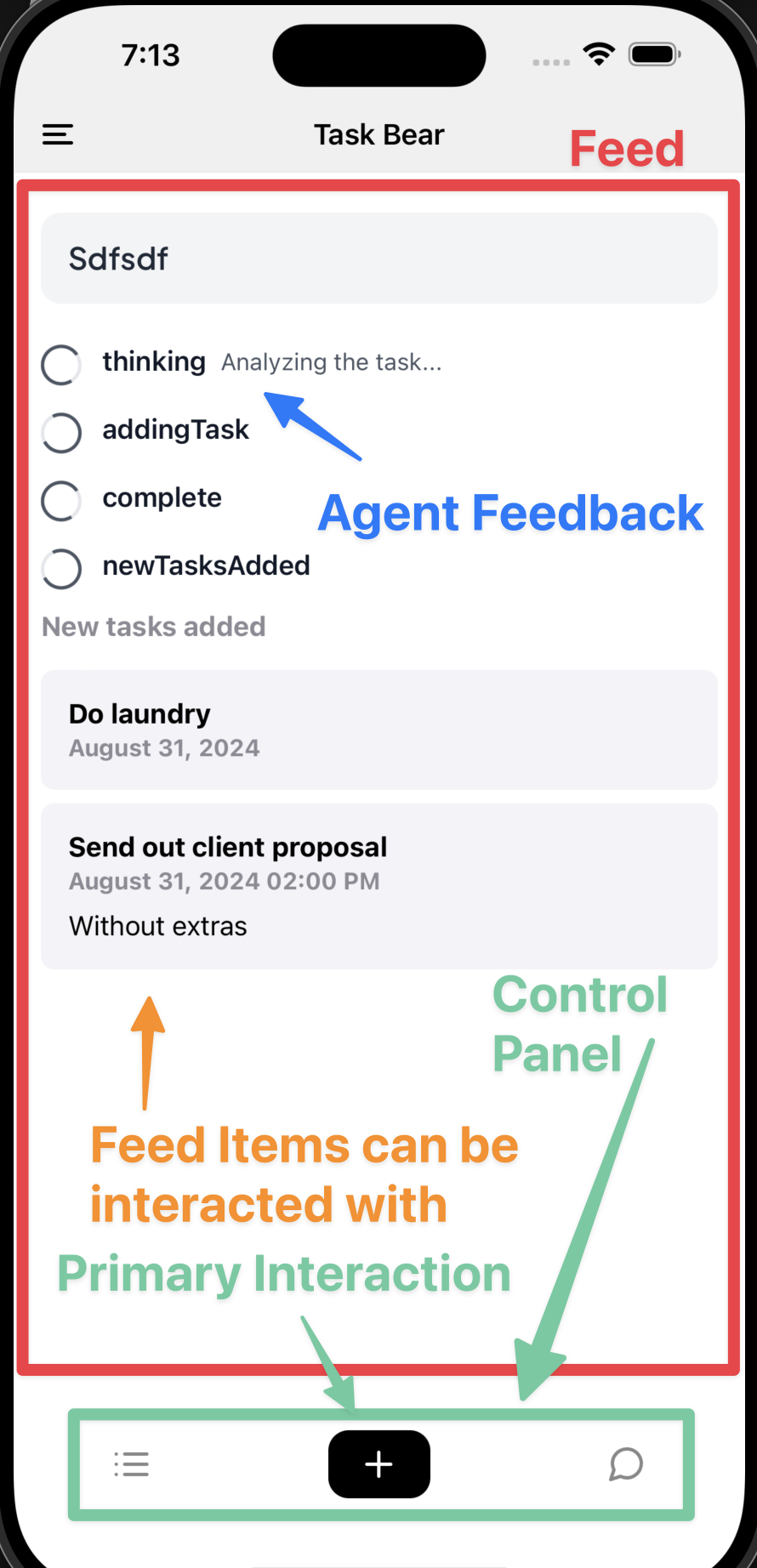
For the “Add Tasks” action, the interaction was deliberately small. Pressing the control would insert a text input into the feed. The bottom controls would disappear while that input was active. After submission, a loading skeleton would occupy the result area while the model broke the request into tasks. The completed checklist would then replace it.
The temporary input and the resulting checklist had different lifetimes. The input only needed to collect a request, and it had a clear submission or cancellation point. The checklist needed to stay available after that exchange ended. Treating both as undifferentiated chat messages would leave the application with no explicit account of which interaction was still waiting for an answer.
A journal action made this distinction more visible. Its input had three stages, including back and cancel controls. Moving backward meant revisiting an input stage; canceling meant leaving the interaction and restoring the app's controls. The app needed to track that progress separately from whatever text the model was producing.
At this point I was building screens manually. Loading arbitrary app definitions into the shared layout remained unfinished. The manual screens helped identify what the layout would have to support: input steps, activity, results and controls whose availability depended on the current interaction.
Letting each checklist keep its own state
The checklist's state belonged to the individual feed item. This was an explicit decision in the Task Bear specification, and it prevented a simple but consequential mistake.
Consider two lists generated during the same session. The first contains preparation tasks for a meeting. The second contains tasks for a piece of writing. If Task Bear kept one global set of checkbox values, generating the second result could replace the first list's state, or a checkbox in one result could affect the other. Each result needed its own record of completed items.
With state attached to a feed item, the person could scroll back to the meeting checklist and continue using it. Creating another checklist would create another result with its own state. Nested tasks also belonged to that result, so expanding or completing an item had a defined target.
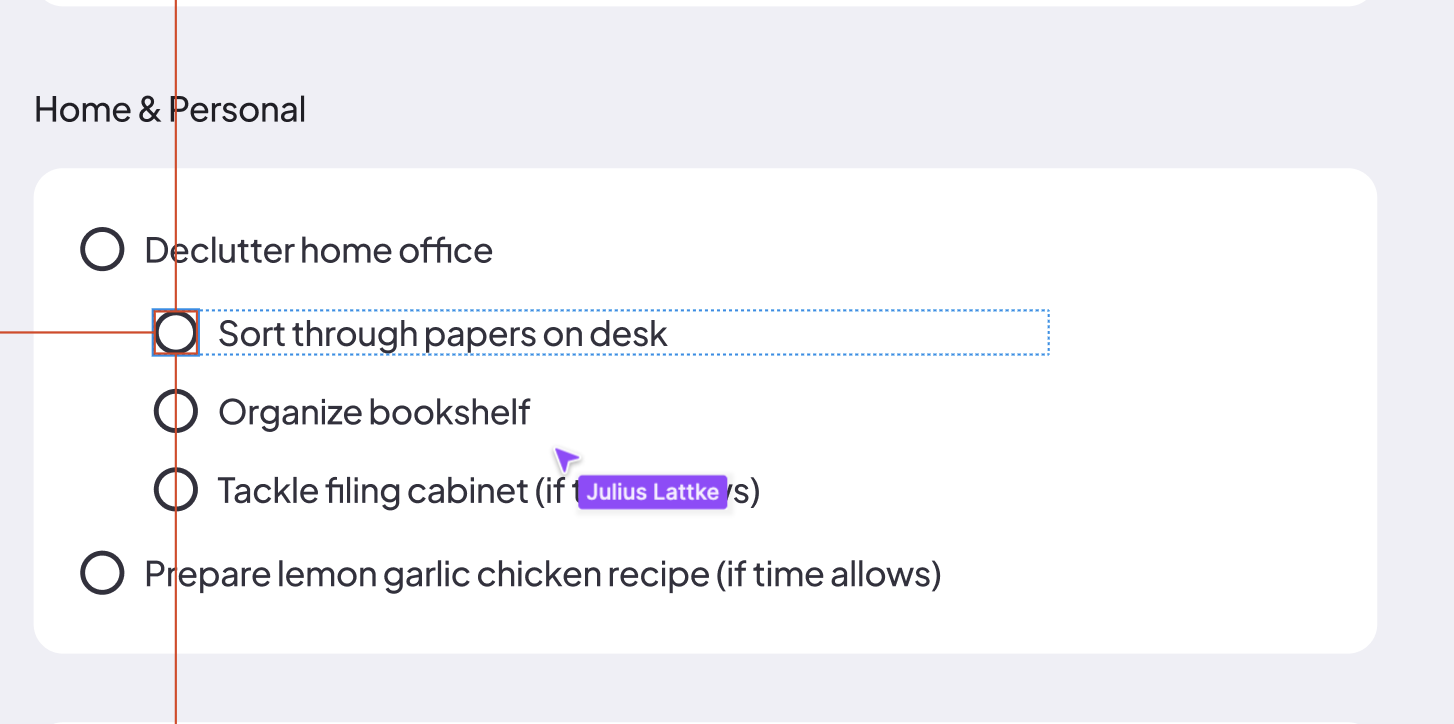
The model's role was to propose the contents of the list. After that, checking an item could be an ordinary application interaction. There was no reason to send a new message asking the model to reproduce the whole checklist with one item marked complete. The application already knew which item the person had clicked.
Julius and I used Storybook to work on these components independently of the agent. A checklist with sample data let us examine nesting, controls and visual states while the execution code was still changing. Separating presentation from the running process made the design easier to discuss: we could change how a task appeared without also having to generate a new task list.
Showing the work behind an answer
Search Agent tested another part of the feed. A checklist becomes useful once its content exists. A search interface also needs to communicate what is happening before the final answer arrives.
I was connecting search over my journal material to an agent. The flow used LangGraph, and vector search was exposed as a tool the model could call. I moved the material and search into Convex, then had the agent report updates there so the interface could react as it worked.
There are several different things an interface might receive during that process. Text streaming reveals an answer as it is written. An activity update can reveal that a search is underway. A citation associates a claim in the answer with material the search found. One does not automatically provide the others. Streaming the final paragraph, for example, says little about what was searched before that paragraph was composed.
Julius's Search Agent design gave these different kinds of information their own places. Search themes appeared above the result, dated source chips exposed the retrieved material, and citation markers connected the answer to its sources. The figure uses placeholder content to show that arrangement.
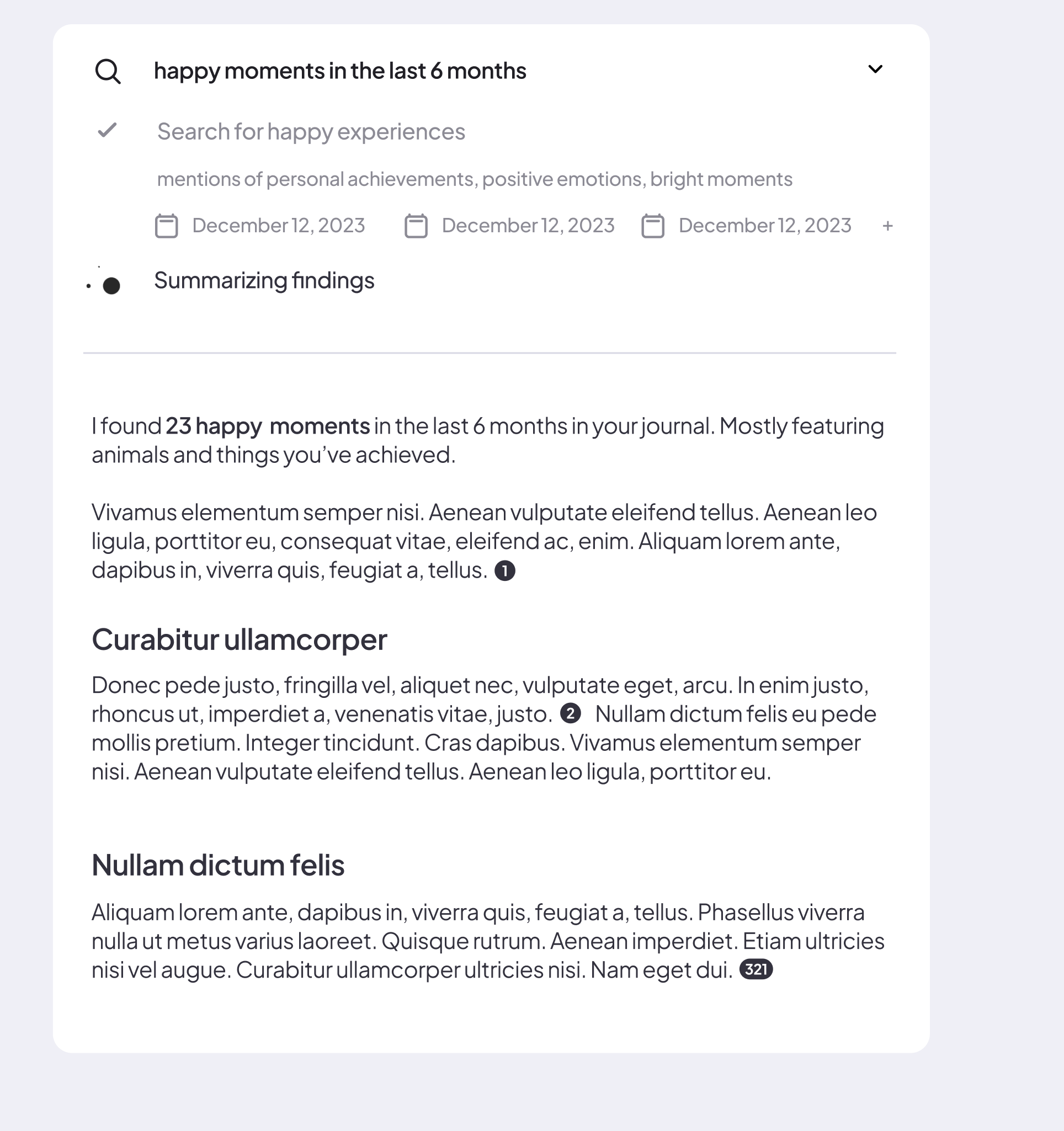
I connected the design to the search flow and got citations working. Text streaming and the display of individual subsearch queries remained work in progress. A further implementation problem was translating LangGraph's events into information a person could use. The graph could emit internal state changes, but the interface needed meaningful descriptions of activity rather than a dump of those events.
The feed now had two distinct responsibilities. It could show a search whose activity was still changing, and it could hold a checklist whose generation had ended but whose controls remained useful. Each feed item needed to identify what it represented and which changes it could still accept. Finishing an AI response was only one transition in the life of the thing on screen.