OpenClaw: what changes when an agent stays runningHow OpenClaw's always-running daemon produces memory, autonomy, and tool use, traced through its source.
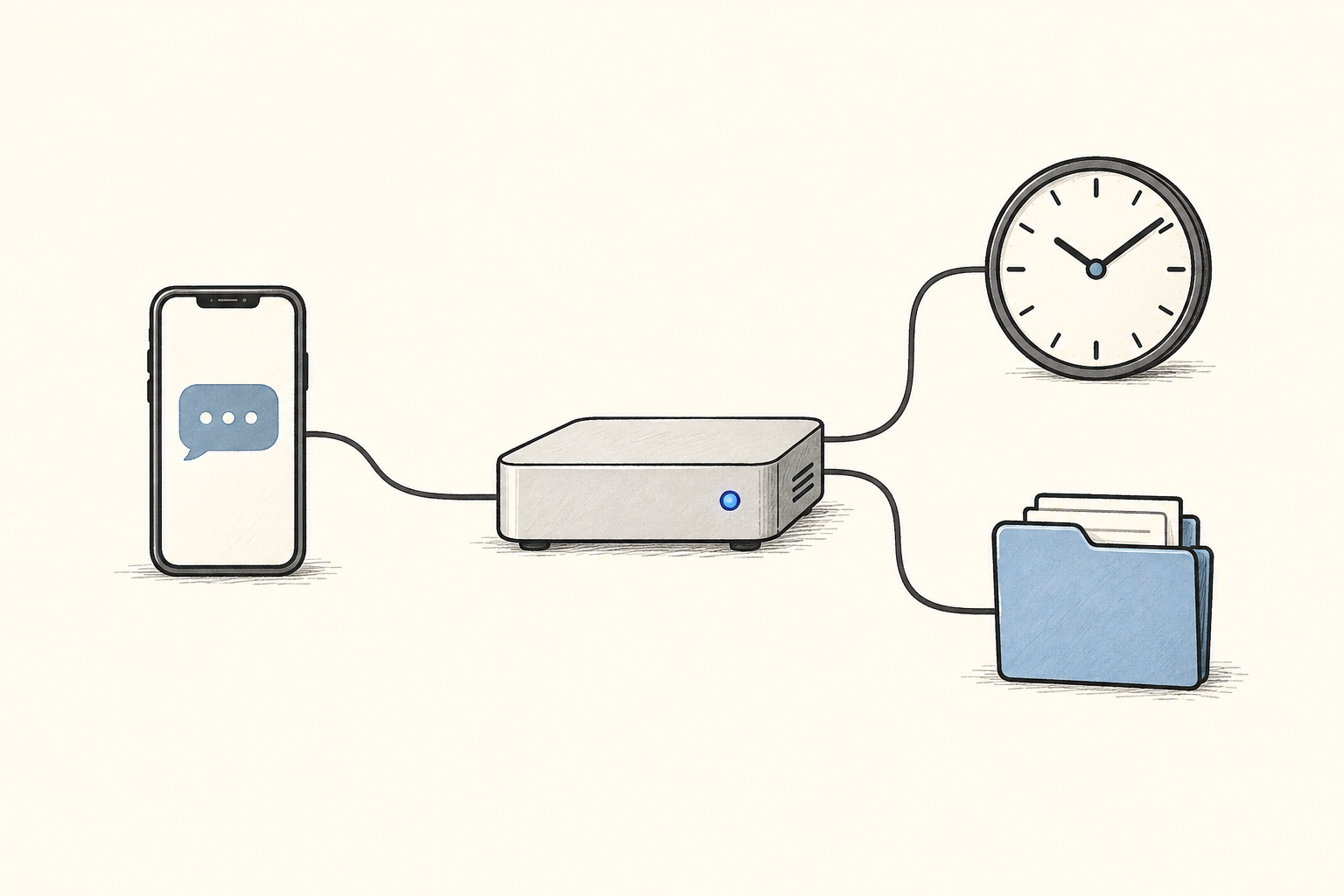
OpenClaw, previously called Moltbot and Clawdbot, runs an AI agent as a daemon on your computer. You talk to it through WhatsApp, Telegram, Discord, iMessage, Slack, or another connected channel. It can use the shell, browse the web, edit files, send messages, and start work on a schedule.
Peter Steinberger created it. Federico Viticci's review on MacStories in January 2026 brought it a wide audience.
Most of those capabilities already exist in Claude Code. I wanted to understand why OpenClaw still felt like a different product to the people using it. The source code points to one architectural difference: OpenClaw stays running after the task ends.
That changes who owns the work between model calls. The daemon keeps the files, transcripts, schedules, triggers, and message connections alive. A model call becomes one step inside a longer process instead of the whole process.
I used the ten elements of agentic system design to trace how OpenClaw builds that process and where the design remains thin.
The difference
| Claude Code | OpenClaw | |
|---|---|---|
| Lifecycle | starts for a task, then exits | runs continuously as a daemon |
| Persistence | organized around a session | keeps files and transcripts across restarts |
| Interface | terminal | messaging apps and terminal |
| Triggers | user starts the session | messages, cron jobs, webhooks, and heartbeats |
| Installation | command-line program | LaunchAgent on macOS or systemd service on Linux |
Suppose I think of an automation while walking: remind me to go to the gym at 2 p.m., check again at 5 p.m., and bother me if I still have not gone. Claude Code can write that program, but I still have to open a terminal, explain the task, create the script, install the schedule, decide where to store state, and inspect it when it fails.
With OpenClaw, I can send the instruction from my phone. The running process already owns a scheduler, persistent workspace, conversation history, and return channel. The agent can turn the request into a scheduled job and message me later through the same conversation.
That smaller setup cost changes how people use it. An automation no longer needs to justify a small software project. Users can accumulate reminders, monitors, summaries, and recurring checks until the daemon functions like a personal server with a conversational interface.
The daemon
The daemon gives OpenClaw one control plane for work that would otherwise end up scattered across cron scripts, Zapier, n8n, Make, and one-off programs. Its workspace exposes the state as ordinary files under ~/.openclaw/, so a user can inspect and edit the same material the agent uses.
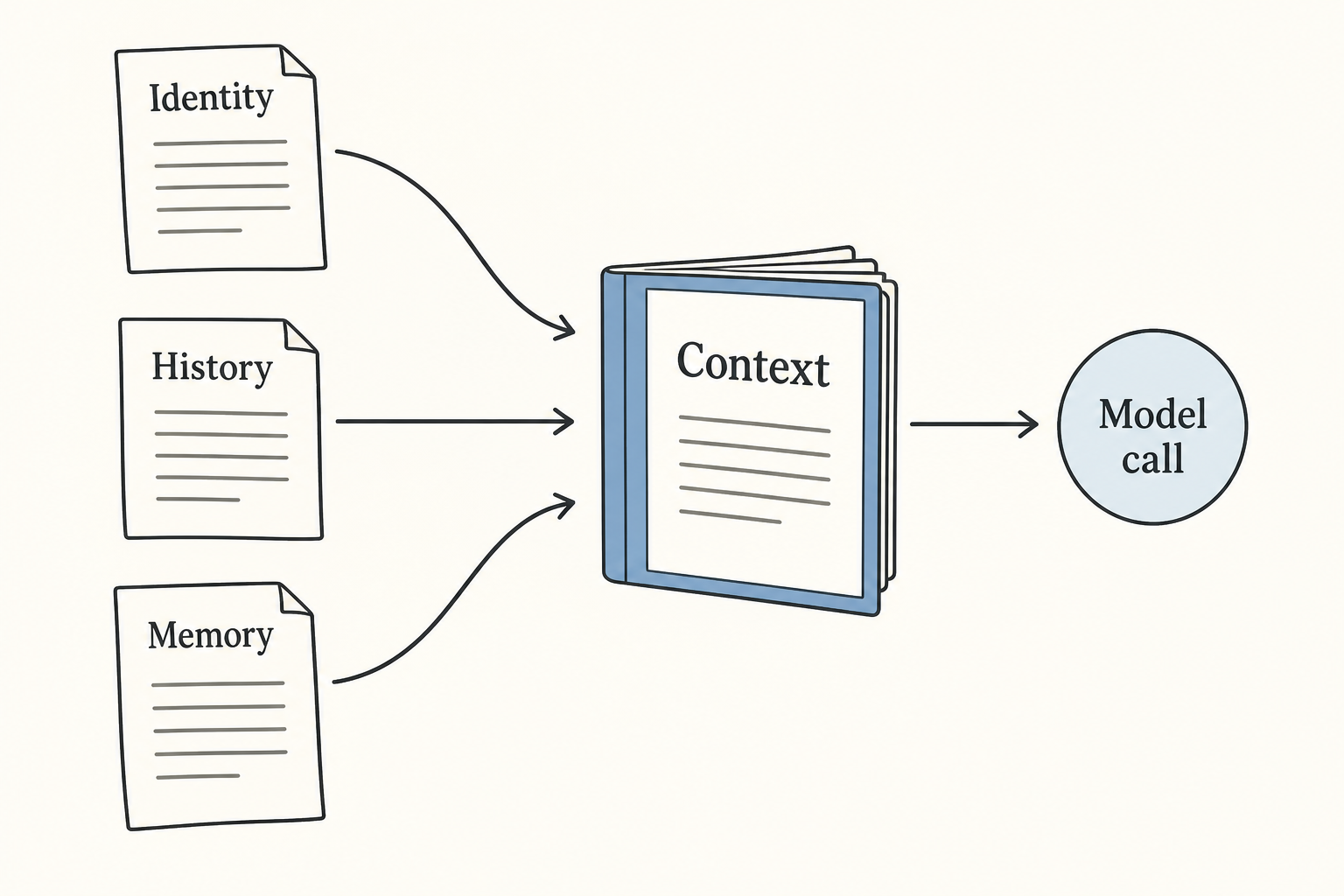
The process also reconnects each new model call to earlier work. When a message arrives, OpenClaw:
- loads its system prompt, identity files, history, and relevant memory;
- calls the model;
- runs any requested tools and returns their results to the model;
- sends the final response back through the originating channel;
- appends the exchange to the session transcript.
The model still handles one context window at a time. The daemon creates continuity by rebuilding that window from persistent state.
Context
OpenClaw assembles the system prompt from files in the workspace:
~/.openclaw/workspace/
├── SOUL.md             personality and tone
├── USER.md             information about the user
├── AGENTS.md           operating instructions
├── TOOLS.md            tool guidance
├── HEARTBEAT.md        periodic checks
├── MEMORY.md           curated long-term notes
└── memory/
    ├── 2026-01-28.md   daily log
    ├── 2026-01-29.md
    └── ...
The prompt builder loads these files as separate context fragments. If it finds SOUL.md, it tells the model to follow that persona and tone. USER.md supplies personal facts, while AGENTS.md and TOOLS.md tell the agent how to work.
Here's the code that loads context files ():
const contextFiles = params.contextFiles ?? [];
if (contextFiles.length > 0) {
  const hasSoulFile = contextFiles.some((file) => {
    const normalizedPath = file.path.trim().replace(/\\/g, "/");
    const baseName = normalizedPath.split("/").pop() ?? normalizedPath;
    return baseName.toLowerCase() === "soul.md";
  });
  lines.push("# Project Context", "", "The following project context files have been loaded:");
  if (hasSoulFile) {
    lines.push(
      "If SOUL.md is present, embody its persona and tone. Avoid stiff, generic replies; follow its guidance unless higher-priority instructions override it.",
    );
  }
  lines.push("");
  for (const file of contextFiles) {
    lines.push(`## ${file.path}`, "", file.content, "");
  }
}
A user can open and edit the files that define the agent's identity. A different SOUL.md produces different behavior because the next model call receives different instructions. The personality does not live inside the daemon or the model. It comes from files the daemon loads on every run.
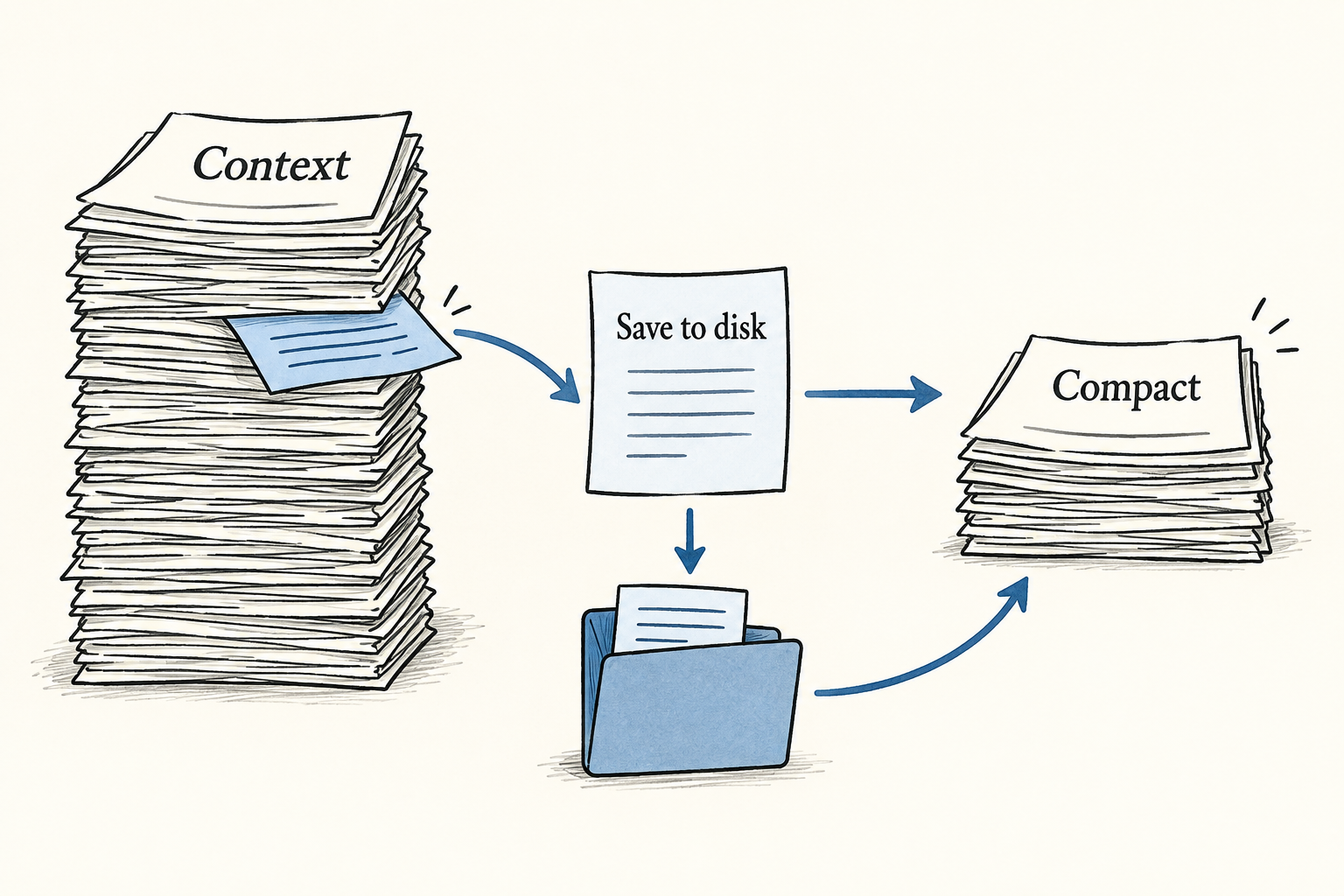
OpenClaw also writes important context to disk before a conversation reaches its limit. By default, the memory flush runs 4,000 tokens before compaction. The model receives an instruction to save useful details, and later calls can retrieve those details after the original messages have left the window.
The check ():
export function shouldRunMemoryFlush(params: {
  entry?: Pick<SessionEntry, "totalTokens" | "compactionCount" | "memoryFlushCompactionCount">;
  contextWindowTokens: number;
  reserveTokensFloor: number;
  softThresholdTokens: number;
}): boolean {
  const totalTokens = params.entry?.totalTokens;
  if (!totalTokens || totalTokens <= 0) return false;
  const contextWindow = Math.max(1, Math.floor(params.contextWindowTokens));
  const reserveTokens = Math.max(0, Math.floor(params.reserveTokensFloor));
  const softThreshold = Math.max(0, Math.floor(params.softThresholdTokens));
  const threshold = Math.max(0, contextWindow - reserveTokens - softThreshold);
  if (threshold <= 0) return false;
  if (totalTokens < threshold) return false;

  const compactionCount = params.entry?.compactionCount ?? 0;
  const lastFlushAt = params.entry?.memoryFlushCompactionCount;
  if (typeof lastFlushAt === "number" && lastFlushAt === compactionCount) {
    return false;
  }
  return true;
}
Memory
The filesystem remains the source of truth. OpenClaw stores curated facts in MEMORY.md, appends daily notes under memory/, and writes complete session transcripts as JSONL:
~/.openclaw/agents/<agentId>/sessions/<sessionId>.jsonlA SQLite index with sqlite-vec makes the Markdown files searchable. OpenClaw combines vector similarity with BM25 keyword scores, then returns the highest-ranked passages to the context builder.
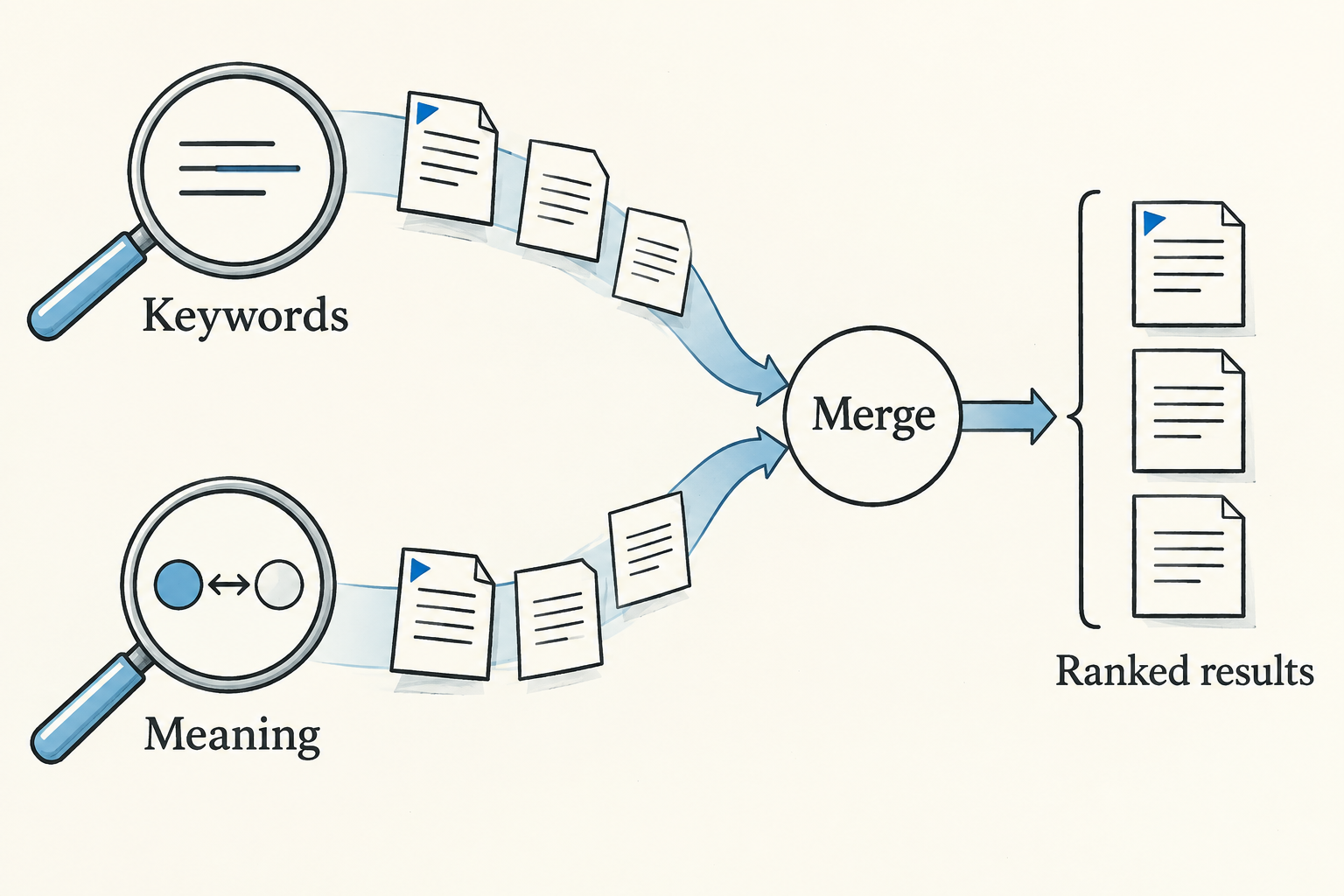
A saved fact does not automatically enter the next context. Retrieval still has to select it. When the agent appears to forget something, I would inspect two steps: whether OpenClaw stored the fact, and whether the next run retrieved it.
Agency
OpenClaw gives the agent several ways to affect the computer around it:
- shell commands with PTY support;
- browser control through a dedicated Chromium instance;
- messaging through connected channels;
- HTML, CSS, and JavaScript served through Canvas;
- device capabilities from connected phones and laptops;
- cron jobs, webhooks, and sub-agent sessions.
A model response cannot perform any of those actions by itself. OpenClaw parses the requested tool call, checks the available tools and policy, and dispatches application code. That execution boundary determines what the agent can do.
OpenClaw controls the boundary at three levels:
- The sandbox decides where a tool runs. The main session runs on the host by default, while group chats can run inside Docker.
- Per-agent allow and deny lists decide which tools a session can call.
- Elevated approvals provide an escape hatch for commands that need more access.
The registry defines capability, and the policy defines permission. Removing a destructive tool closes that path even if the model requests it. Allowing the tool on the host gives a prompt the same practical reach as the user account running OpenClaw.
The loop
OpenClaw uses a conventional agent loop. It assembles context, calls the model, executes a requested tool, adds the result to context, and calls the model again. The loop ends when the model returns a final response.
The core runner also handles queueing, authentication, model selection, context limits, and failover. It does not impose a separate planning stage or a generate-then-evaluate pipeline. The model chooses the next action from the current context, observes the result, and chooses again.
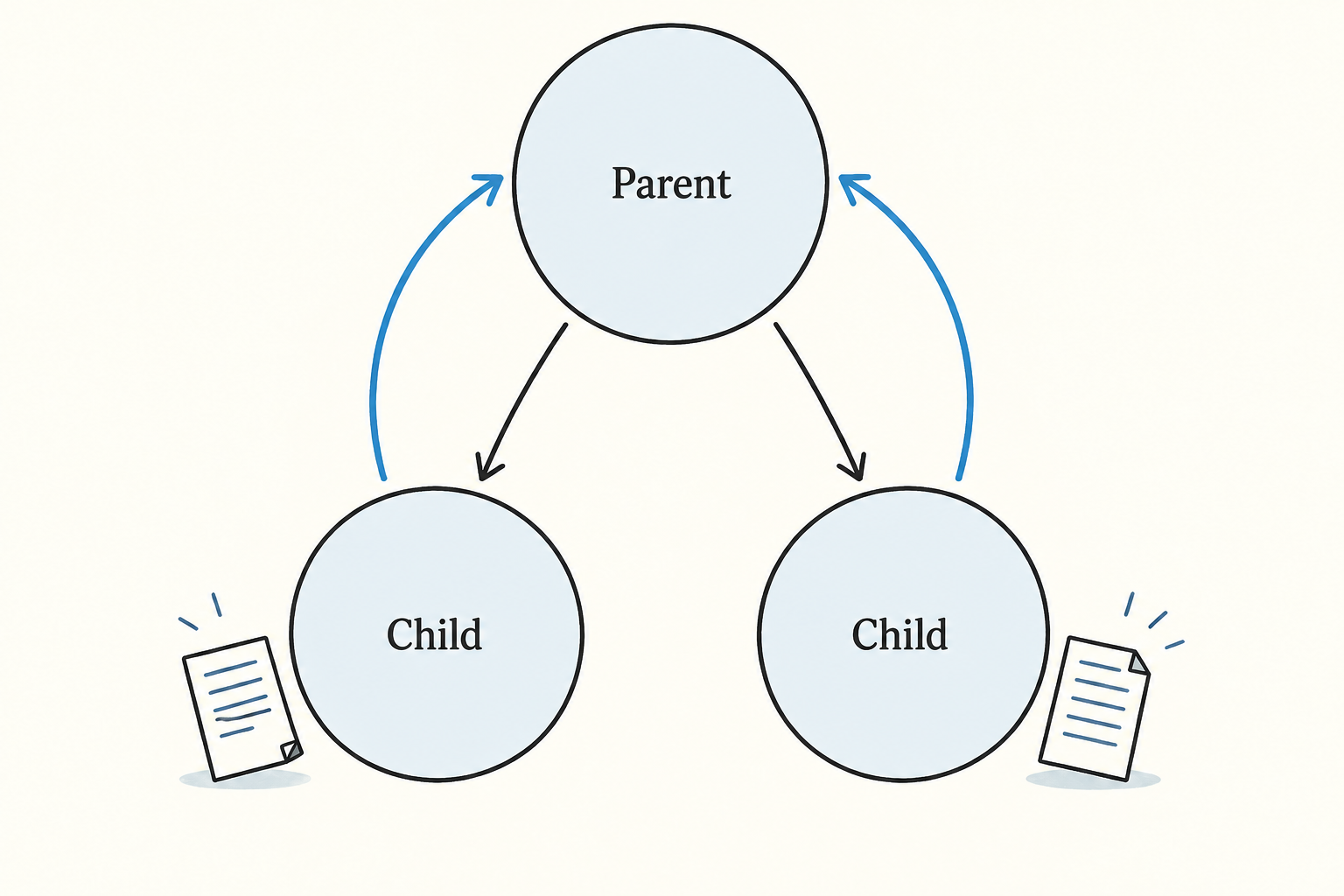
For larger tasks, a parent session can start a child with sessions_spawn. The child receives its own context and transcript, completes the assignment, and reports the result to the parent. sessions_send lets sessions exchange messages directly.
OpenClaw stops the tree at one level. A child session cannot spawn another child:
if (typeof requesterSessionKey === "string" && isSubagentSessionKey(requesterSessionKey)) {
  return jsonResult({
    status: "forbidden",
    error: "sessions_spawn is not allowed from sub-agent sessions",
  });
}
That limit prevents recursive agent growth. Agents can still coordinate through shared workspace files, which also serve as persistent artifacts after a session ends.
Autonomy
The daemon can begin work without an active conversation. OpenClaw exposes four mechanisms for that.
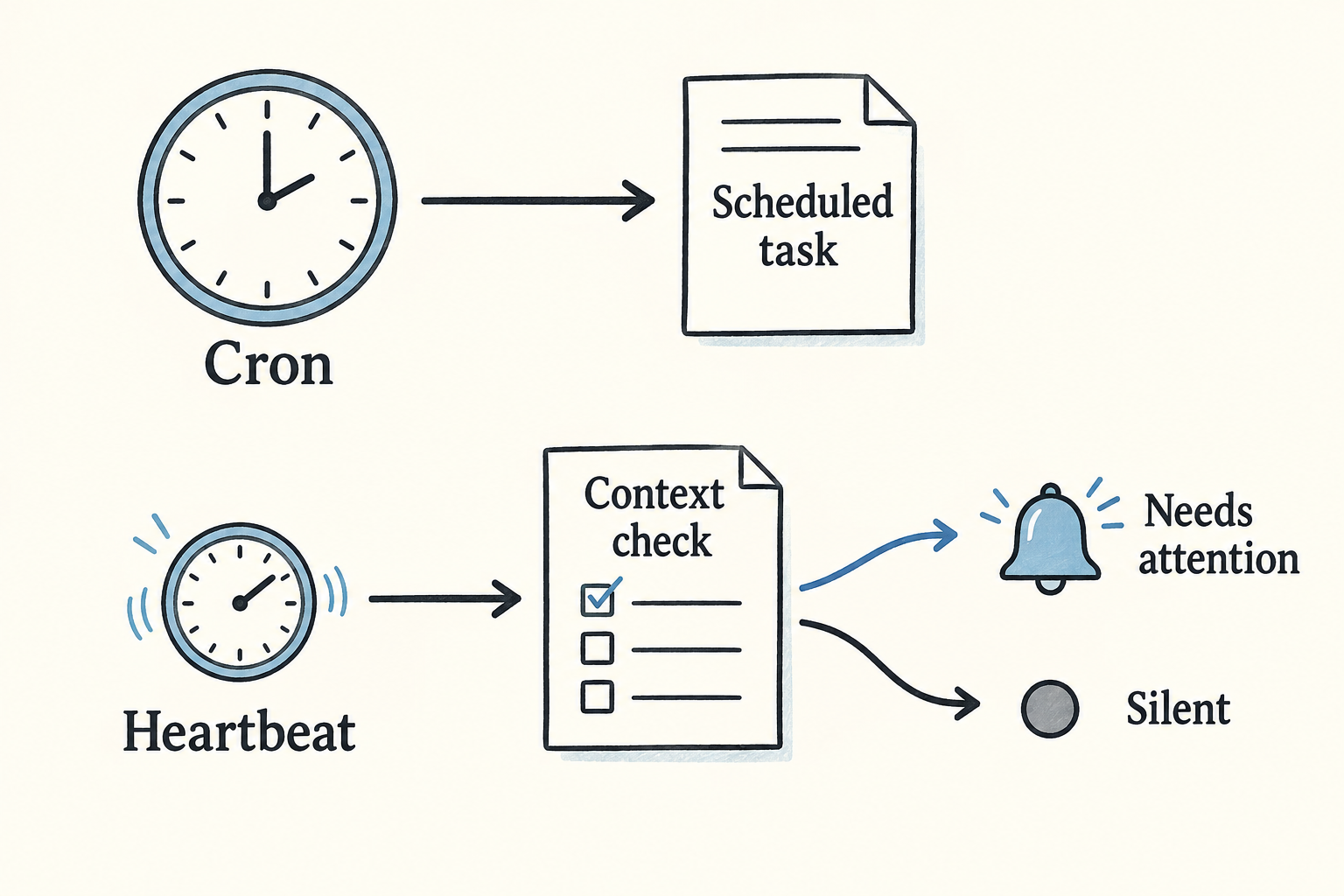
Cron runs a task at a precise time. A job can reuse the main session or start in an isolated session:
{
  "id": "daily-standup",
  "schedule": "0 9 * * 1-5",
  "task": "Check my calendar and Slack for today's priorities",
  "session": "isolated"
}
Webhooks let GitHub, Zapier, home automation, and other external systems start a run.
Heartbeat wakes the main session every 30 minutes by default. The agent reads HEARTBEAT.md, checks the current context, and returns HEARTBEAT_OK without sending a message when nothing needs attention. Cron executes a known task at a known time. Heartbeat asks the agent to inspect the situation and decide whether to act.
Lobster handles workflows that need deterministic steps, approval gates, and resumable state. It stores those pipelines as .lobster files instead of asking the model to improvise the entire sequence on every run.
These triggers produce the practical difference from a terminal session. A user can leave, close the laptop, or stop thinking about the task while the process retains responsibility for starting it again.
Evaluation
OpenClaw invests much less in evaluation, feedback, and learning than it does in context, memory, agency, and autonomy.
The built-in evaluation layer tracks tokens and cost and includes Vitest suites for the software itself. It does not provide an LLM judge, prompt experiments, or automatic quality metrics. For a personal assistant, the user sees the output and supplies most of the evaluation.
Feedback follows the same pattern. A user corrects the agent in conversation, and the agent can write the preference into MEMORY.md. A later memory search may load that preference into context. OpenClaw does not maintain a central response-quality dataset or optimize against one.
The agent can also edit SOUL.md, AGENTS.md, and the other files that shape later prompts. That gives it a form of persistent self-modification. It changes instructions and memory on disk; it does not tune model weights or automatically prove that the change improved future work.
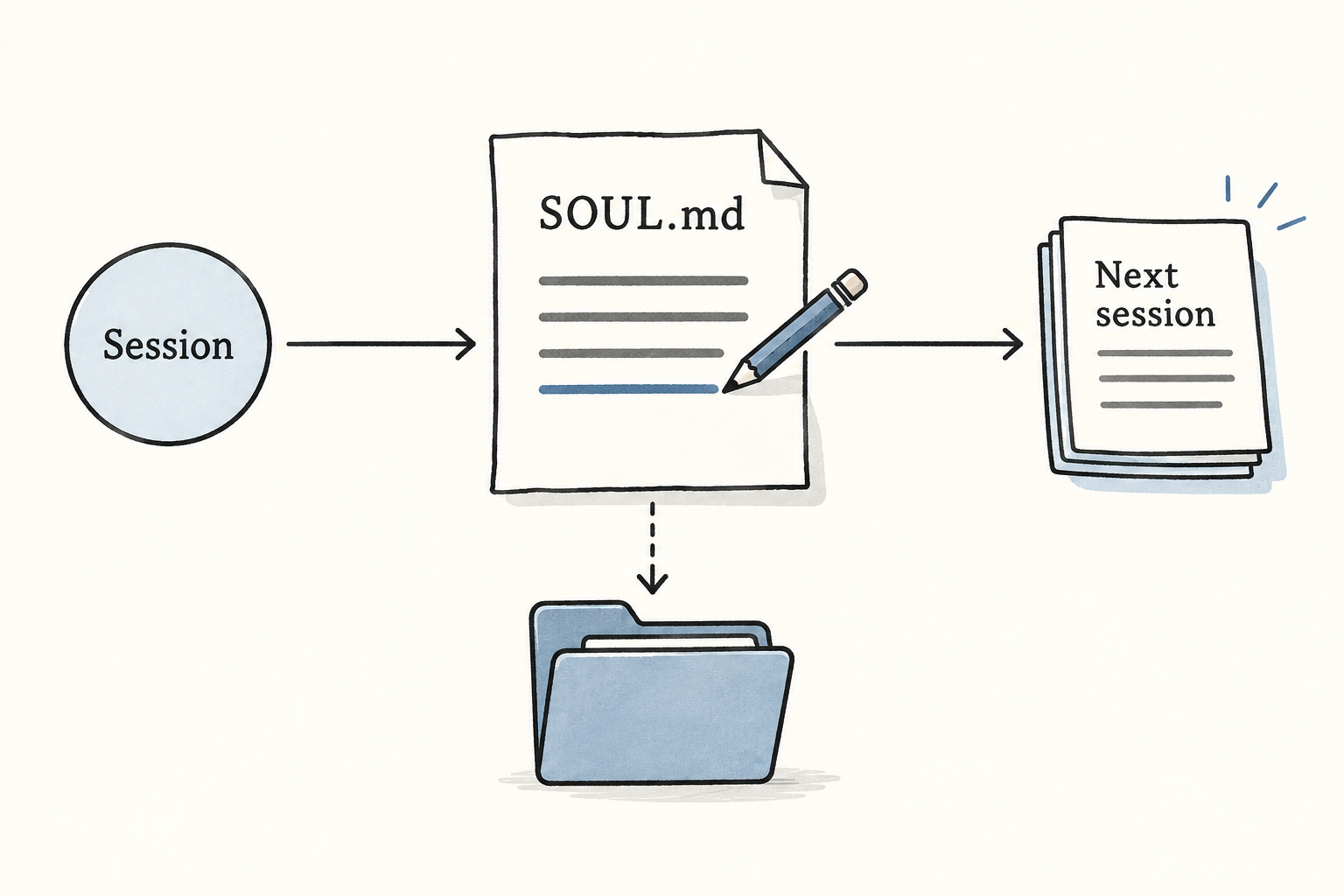
OpenClaw can preserve a correction and reuse it. The user still has to judge the result, and the system has no strong built-in loop for measuring whether the stored correction helped.
Permissions
Persistence and broad tool access increase the cost of a bad instruction. A short-lived coding session ends when I close it. OpenClaw keeps listening, retains credentials and context, and can act later through schedules or incoming messages.
The main risks follow directly from those capabilities:
- host shell access exposes local files and processes;
- content from the web, email, or chat can carry prompt injections;
- local configuration files may contain credentials;
- stored instructions can trigger harmful behavior later;
- messaging and webhooks give the agent channels for sending data out.
Vectra applies Simon Willison's "lethal trifecta" to this combination: private data, untrusted input, and external communication. OpenClaw contains sandbox, tool-policy, and approval controls, but the main session runs on the host by default because local access supplies much of the product's value.
Every new tool or trigger widens the paths from text to effects. A secure installation therefore depends on concrete configuration: which sessions run in containers, which tools each channel can use, which actions require approval, and which credentials the process can read.
Deployment
OpenClaw can run locally as a LaunchAgent on macOS or a systemd service on Linux. That gives it direct access to the user's machine and keeps the workspace under the user's control.
Cloudflare also publishes the moltworker reference deployment. It combines Workers, the Sandbox SDK, R2 storage, Browser Rendering, and AI Gateway. The Workers paid plan starts around $5 per month, with model and service usage charged separately.
The deployment choice changes the security boundary. A local daemon can reach the user's files and applications. A hosted version trades some of that reach for a container and network boundary that the operator can configure separately.
The ten elements
The full decomposition shows where OpenClaw concentrates its engineering:
| Element | OpenClaw implementation |
|---|---|
| Context | identity files, session history, memory retrieval |
| Memory | Markdown files, JSONL transcripts, SQLite vector and keyword search |
| Agency | shell, browser, messaging, devices, cron, and webhooks |
| Reasoning | iterative model and tool loop |
| Coordination | parent and child sessions with one delegation level |
| Artifacts | workspace files, Canvas output, and transcripts |
| Autonomy | cron, webhooks, heartbeat, and Lobster workflows |
| Evaluation | token and cost tracking, plus software tests |
| Feedback | corrections written into memory files |
| Learning | later prompts changed through memory and identity-file edits |
Context, memory, agency, and autonomy explain most of the excitement. OpenClaw keeps a model connected to the same state, tools, triggers, and return channels for weeks instead of reconstructing that setup as a new project every time.
Evaluation and learning remain mostly manual. Permissions require careful configuration because the daemon combines long-lived context with access to private data and external systems.
OpenClaw uses familiar models, tools, files, and schedulers. Keeping them together inside one running process removes enough setup work that small automations become worth creating. That is why it feels different from opening Claude Code, even when Claude Code could perform the same individual action.