Controls for agent workflowsInterface studies for Idyllic's desktop builder and mobile app.
Building Idyllic - Prior Iterations
June-August 2025
An agent that responds to incoming messages has to keep working while its author changes it. I was building that kind of agent in Idyllic: a prompt, custom procedures and triggers that could start those procedures without someone pressing Run. I wanted people to describe what an agent should do, inspect the resulting program, and then use it in their daily lives.
That put the builder and the running agent in the same application. A conversation with the builder could change the instructions. A conversation with the finished agent would execute them. Both looked like chat, but they changed different things, and the interface had to make the difference understandable.
Keeping an editable draft beside a running agent
The Telegram prototype made the problem concrete. A Message Received block contained an instruction to reply using the Send Message tool. The trigger and the action appeared together in the document, so someone reading it could see what started the procedure and what the agent was supposed to do next.
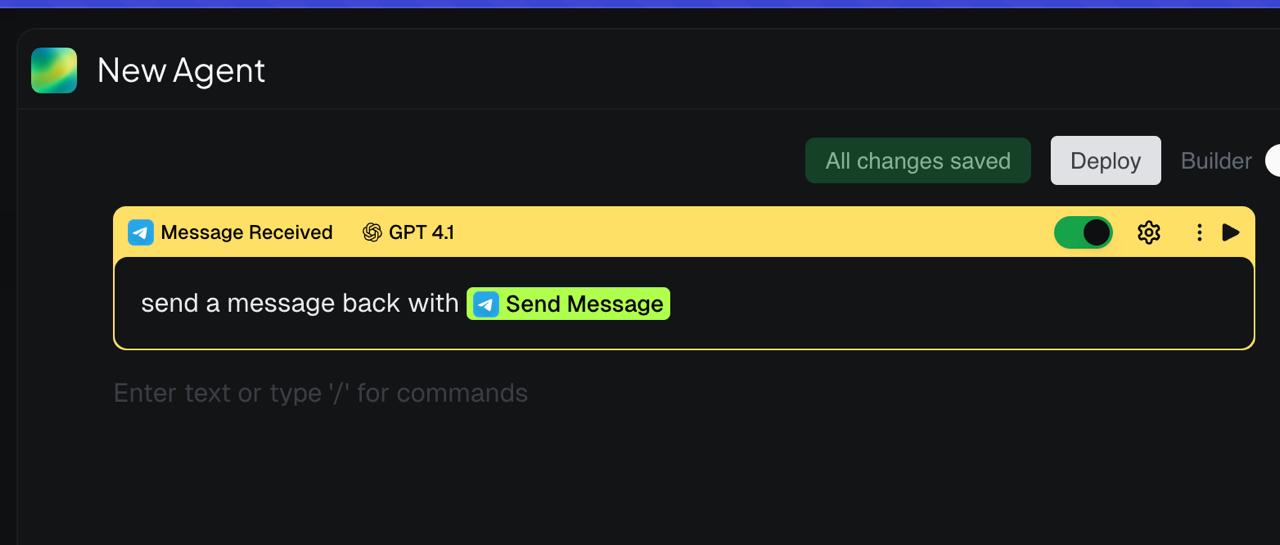
Suppose the author was halfway through changing that instruction when another message arrived. If saving the editor also changed the running agent, the incoming message could execute an unfinished procedure. Autosave, usually a convenience, would make every keystroke a possible change to active behavior.
I designed a separation between the current draft and a deployment snapshot. The editor could keep saving the draft while execution used the latest deployed version. Publishing a new snapshot would be an explicit transition. Local undo would help with editing mistakes, and synchronization between tabs would keep two open editors from presenting different versions of the draft.
The builder also needed a dependable way to change the document. I had implemented conversion between XML and the BlockNote editor's blocks, then added tests and evaluations for document generation. The model produced a structured representation; a deterministic parser turned that representation into editor content. Conversion in the other direction let the same document return to text the model could work with.
This gave generation a specific output to aim at. A malformed document was a failure at the representation boundary, which I could test separately from whether the instructions made a useful agent. I could also improve the parser without asking the model to perform the editor's bookkeeping through a growing collection of small commands.
Seeing what a function block does
Julius and I worked through the function interface in Figma. A reusable function needs a definition containing its procedure and a way to call that function from somewhere else. If both appeared as identical blocks, someone inspecting an agent could confuse changing a procedure with supplying inputs for one execution of it.
The inputs made this distinction visible. A search call needs a query, while a campaign operation might need several parameters. Those fields belong to the particular call. The function being called has its own definition, which may be reused elsewhere. We explored different icons and treatments for the two, including a function symbol for the definition and a lightning bolt for execution.
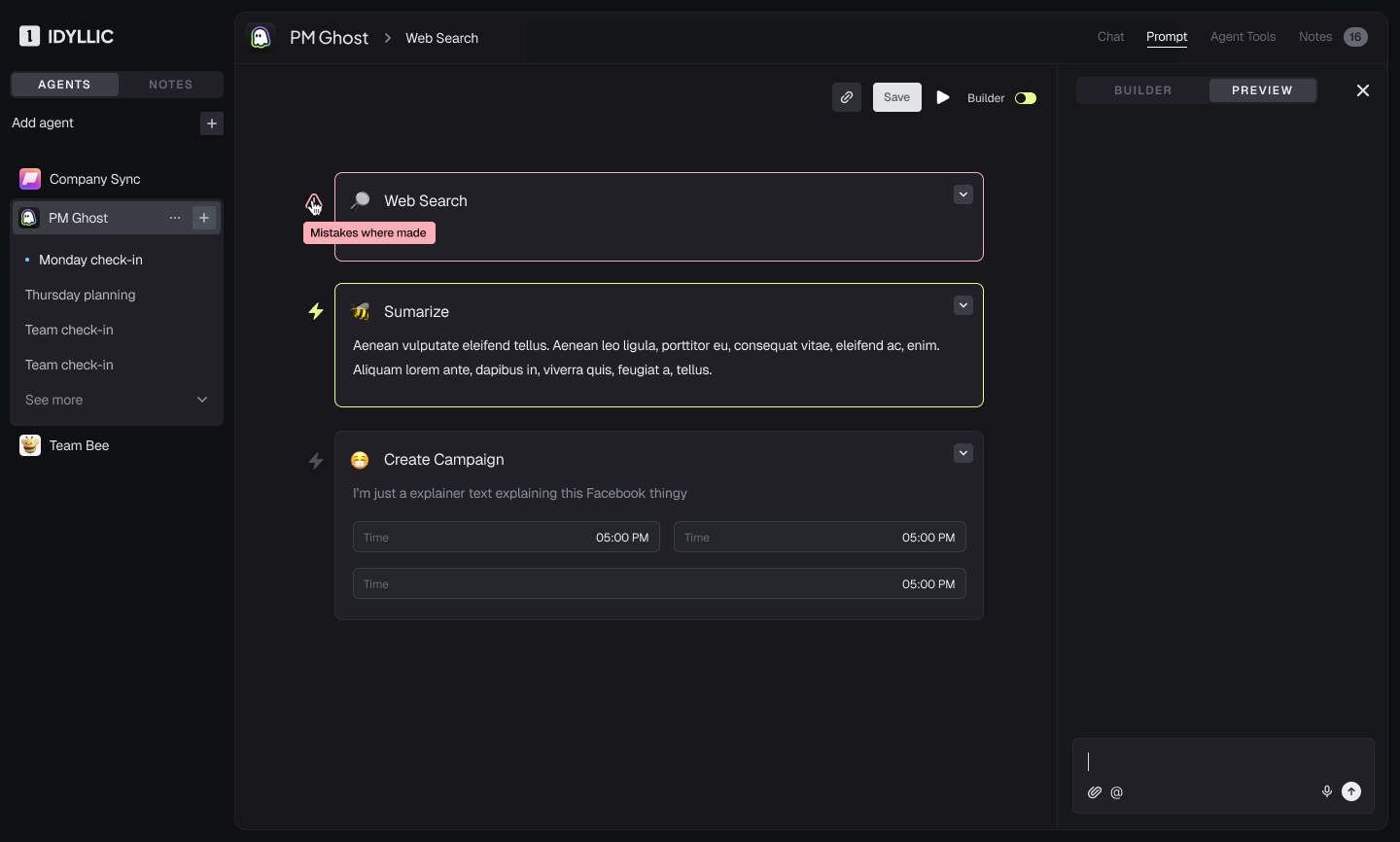
The design above puts Web Search, Summarize and Create Campaign in a procedure beside a preview pane. It also shows why one density could not serve every moment of editing. A newly inserted operation needs its inputs exposed so the person can complete it. Once configured, the same fields can obscure the sequence if every block stays expanded. We considered opening parameters during authoring and allowing a compact representation afterward.
Button placement carried part of the program's meaning. Play beside a procedure suggests testing that procedure; Play at the agent level suggests a broader run. Repeated Save buttons introduced another ambiguity: whether someone was saving a field, the function or the agent. These were questions we worked through in the layouts, where the relationship between a control and its target could be seen.
The frame includes designed error and active states. Those states turn the procedure into something a person can follow during execution: which operation is active, where a failure occurred, and which result belongs to which step. The preview then has a specific job alongside the editor, showing the effects of the procedure being tested.
Making execution visible in the document
I implemented streaming text inside individual executed blocks. That required the runtime's events and the editor's state to agree. A chunk of generated text needed to reach the block executing that generation, and a later run needed to remain distinguishable from an earlier one.
The synchronization work exposed stale state, duplicate events and recursive updates. These were visible product problems as well as implementation problems. If an output appeared under the wrong block, someone testing a procedure could draw the wrong conclusion about what that block did. The execution display had to preserve the relationship between the program, the run and the arriving output.
This changed what I needed from a preview. A final answer could tell me whether the overall result looked useful. Output attached to the executing steps could help me locate where the procedure stopped matching my intent. The document was becoming both a way to specify behavior and a place to inspect that behavior as it happened.
Giving the agent's user a useful response
The mobile playground explored what a person should see once they were using the agent. A presentation-preparation example offered an explicit choice to create a checklist. Selecting it added the response to the conversation, followed by a document card.
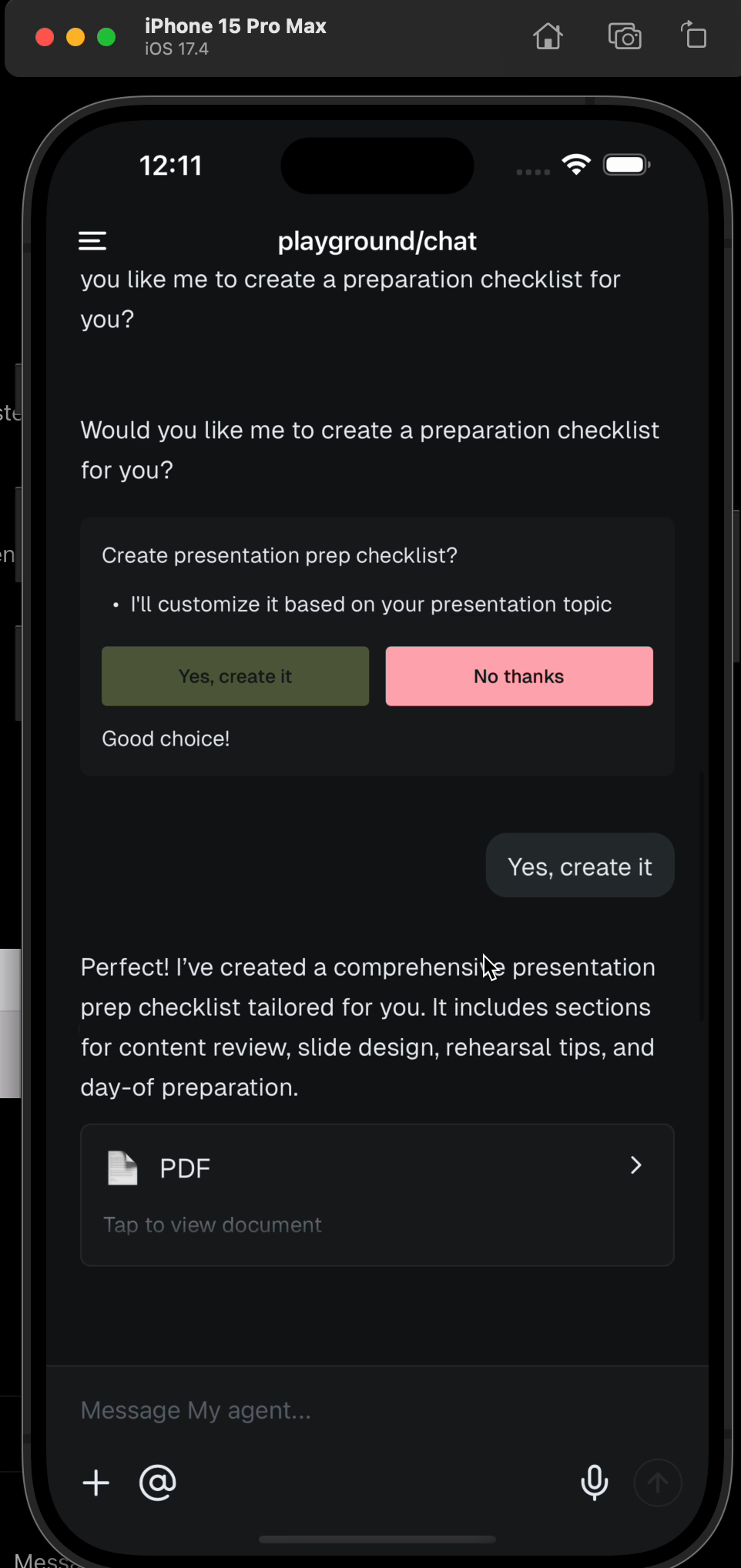
A button gave the response an exact form that the application could handle. The person did not have to compose a sentence and rely on the model to interpret it as the intended choice. The document card gave the resulting checklist somewhere to open, so the conversation could continue without carrying the entire document as another long message.
I tested these components and their message protocol in a playground before connecting the full Day Bear behavior to the engine. The interaction could be evaluated on its own: the agent asks for a choice, the person makes it, and the result appears as an object they can open. That was the user-facing counterpart to the builder's execution view, with controls shaped around the decision the person was making at that moment.