Documents that run AI proceduresIdyllic's document-editor prototype from spring 2025.
Building Idyllic - Prior Iterations
March-May 2025
I wanted to write an AI procedure in a document and run it from the same page. The instructions could sit beside the background material they referred to. After a run, I could open the result, change the procedure and try again.
One example in my design notes was a journal reflection: select a week's entries, reflect on their ideas, and save the reflection as a new document. It looked simple on the page. Making it work meant deciding how an instruction found its inputs, what passed between steps and what the program actually returned.
The document as a program
A document already gives people useful ways to organize a procedure. Headings group related work. Paragraphs explain what to do. References point to material elsewhere. I wanted those familiar elements to have an executable meaning.
The document editor therefore worked on a structured program underneath. A section could contain a sequence of steps; a step could refer to a document, an object or a tool. The runtime walked that structure to decide what to execute. This gave a heading or reference a defined role that survived changes to the page's appearance.
The Idyllic 2.0 mockup shows the broader idea: structured information, action controls and a chat composer on one page. A person could inspect the material and ask for an operation on it.
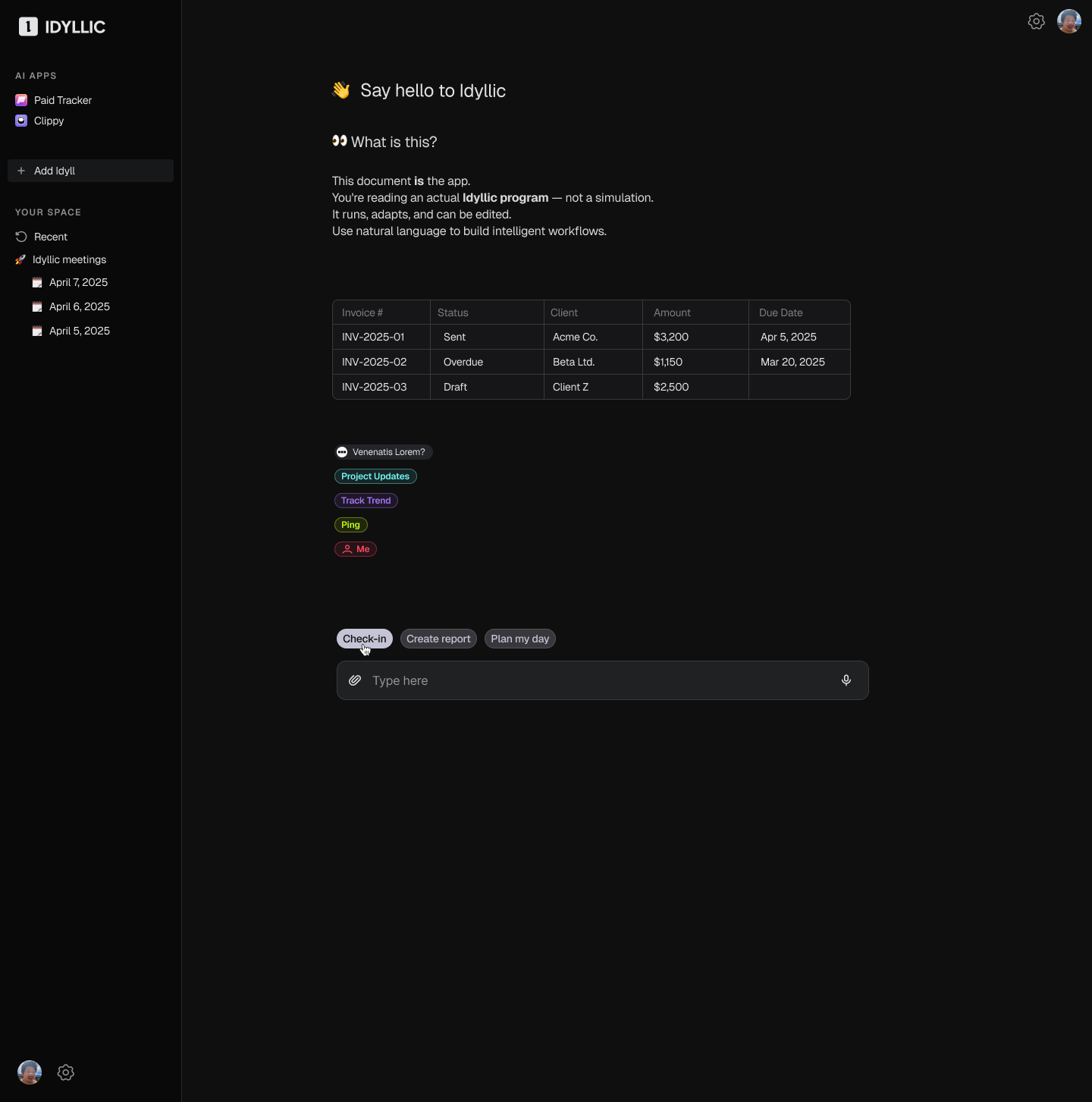
The reflection procedure can be written in three instructions:
- Read a week's journal entries from
@Documents. - Generate a reflection on the ideas in those entries.
- Create a document containing the reflection.
The references were important. @Documents identified a collection the system could inspect. A reference to a particular document retained its identity even when shown as a readable name or an inline pill. That let natural-language instructions refer to real objects without requiring the user to type their internal IDs.
Running one instruction
“Read a week's journal entries” is more than a single text-generation request. The system has to find the entries before it can do anything useful with them.
In the walkthrough, the agent first received a view of the document directory, with names and IDs. It could then select documents and fetch their contents. I wanted it to be able to ask for more information until it had enough to complete the instruction, rather than assuming that one retrieval would always suffice.
This was the role of the agentic execution loop inside a step. It interpreted the instruction and used the available tools to carry it out. A simple step could call a known function; a more open-ended step could need several tool calls.
Passing results between steps
An outer loop moved through the procedure in order. Its job was to retain each step's result and make the appropriate information available to later steps.
This exposed an ambiguity in how I was using the word “context.” The execution could remember that it had selected several documents, while the next model request still lacked their text. Holding a document reference in program state does not automatically put its contents in a model's prompt.
I had to separate the two:
- Execution state records the selected objects, completed steps and results of the run.
- Model context is the information supplied to a particular model call. The executor must decide what to load or include from that state.
For the reflection step, the executor had to fetch the selected journal entries and supply their contents to the model. The collection's identity alone gave the model nothing to reflect on.
I explored context scopes to keep this flow local to the work being done. Entering a section or event handler established the information available there; completed steps added their requests and results. An instruction could also contain a phrase for AI to resolve using the information available at that point, such as turning a rough description into a search query.
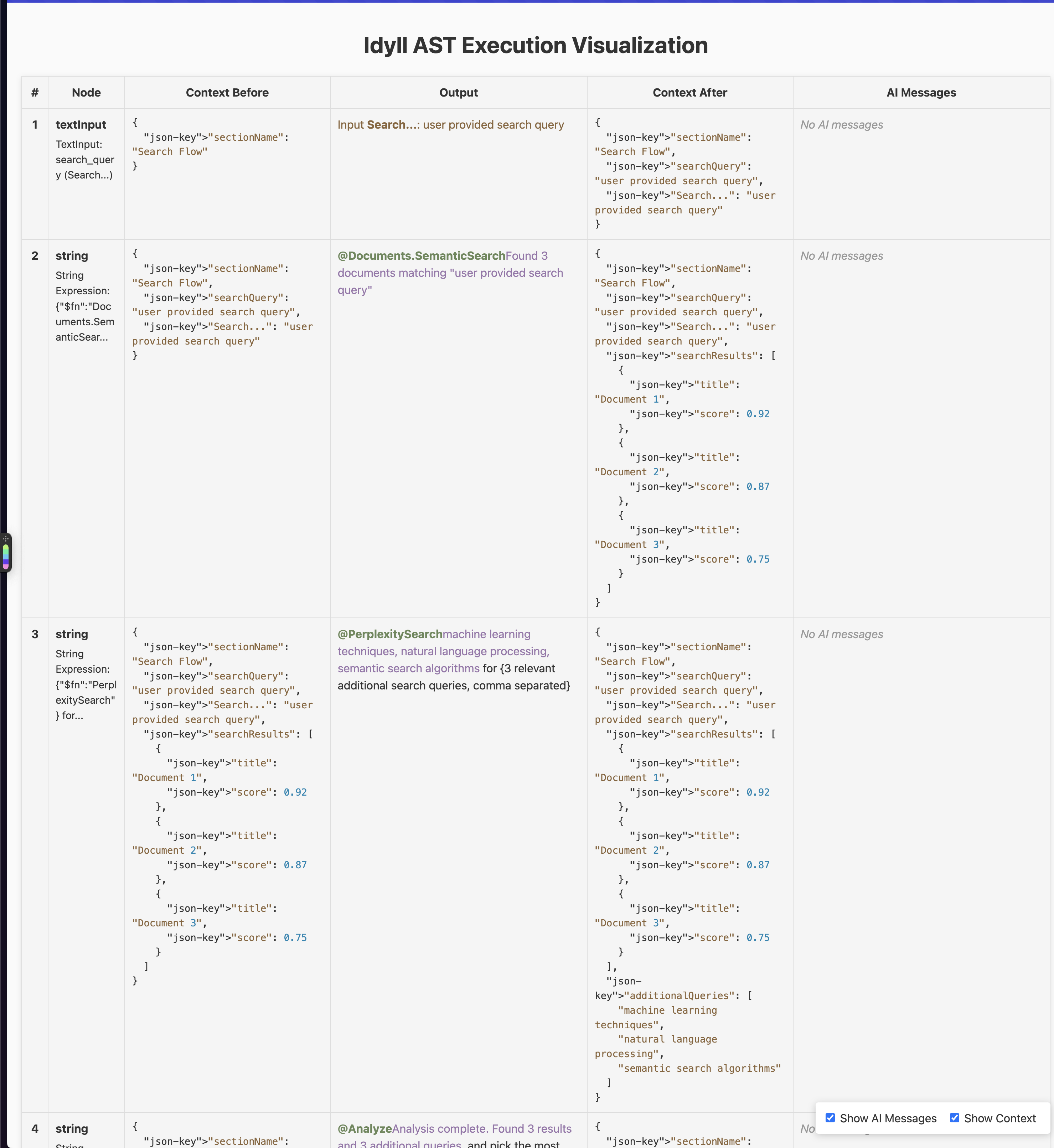
The development table let me inspect the context before and after each operation. Its search example begins with a query, adds document results, then passes both onward. I could check the state transitions with example data, while inspecting the actual messages sent to the model remained a separate check.
I also tried executing document prompts in parallel. Sequential execution became the more useful starting point because a later instruction could build on what an earlier one found. In the reflection example, generating the reflection before selecting the journals would break the dependency the page was supposed to express.
The generated document
The final output needed to be a document in the application. Returning a chat message saying the procedure had finished left the artifact card with nothing to open.
The intended path through the reflection example was:
- Start a run. Parse the document into a sequence of instructions and initialize its execution state.
- Resolve the inputs. Find the selected journal entries and load the material needed for the reflection.
- Generate the reflection. Run the instruction with that material and retain the resulting text.
- Create the output document. Give the document-creation tool a name and content; receive the identity of the new document.
- Return that document to the interface. The artifact card opens it, and citations can link to the generated result.
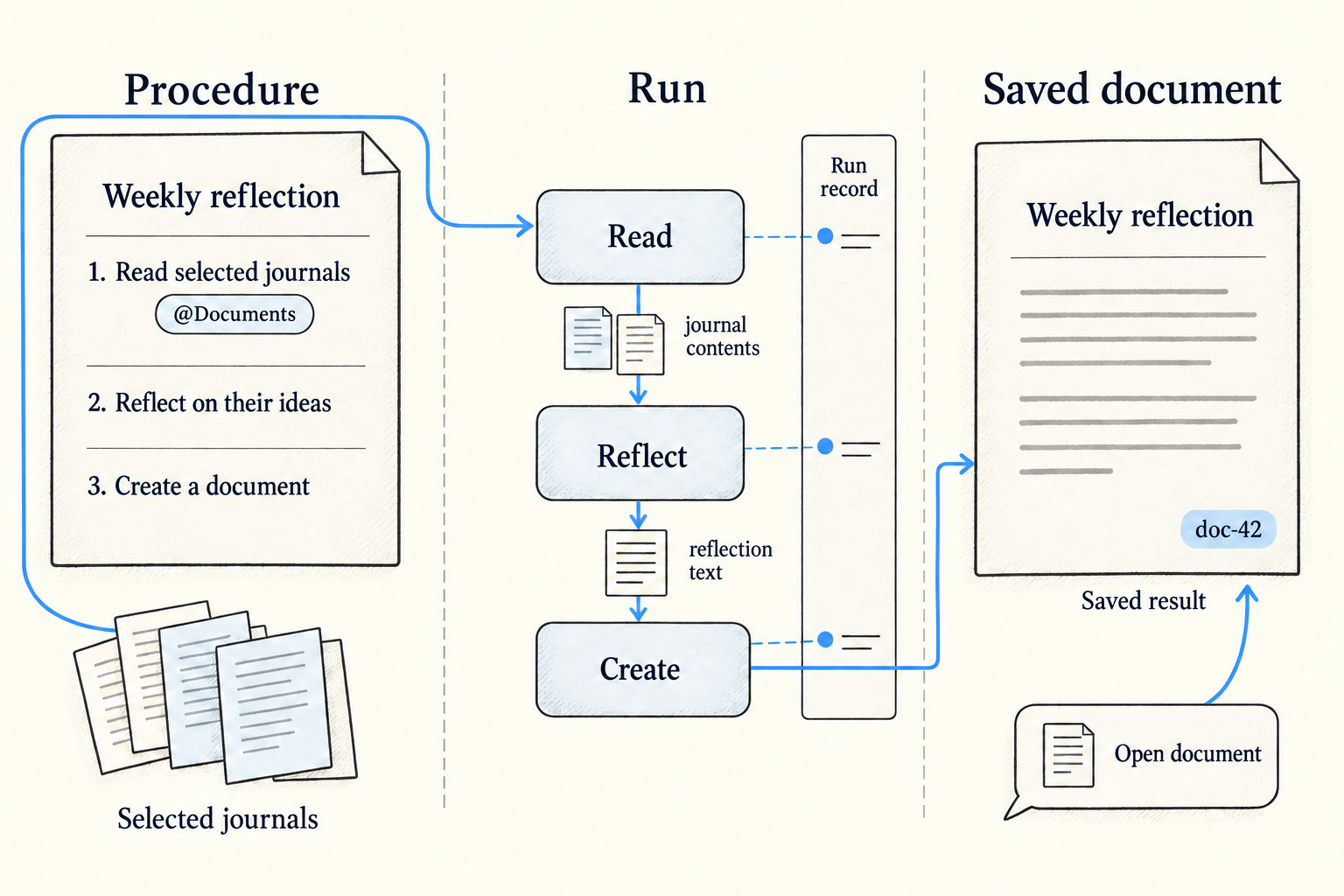
I changed executeDocument to create that new document, implemented Julius's artifact design and connected citations to the generated result. The order of those tasks mattered: the card and citations both depended on having a concrete document to point to.
The prototype was still resolving how headings and surrounding prose should influence each prompt. Chat persistence also remained unfinished, so assigning generated documents to persistent conversations was a separate problem.
The execution movie
A person waiting for the reflection needed to understand what was happening before the final document appeared. The development table exposed the execution rules, but asked the reader to inspect too much internal state.
Julius designed a compact animated display that we called the “movie.” It let you watch the procedure unfold: operations appeared with status indicators, completed work remained visible, and the active operation showed what was happening now. That unfolding sequence is what made the movie metaphor fit.
Each operation could expand to show its contents. Reading sources might reveal the documents being used; creating a document might reveal the emerging artifact. The surrounding row stayed consistent while the detail inside it could suit the operation.
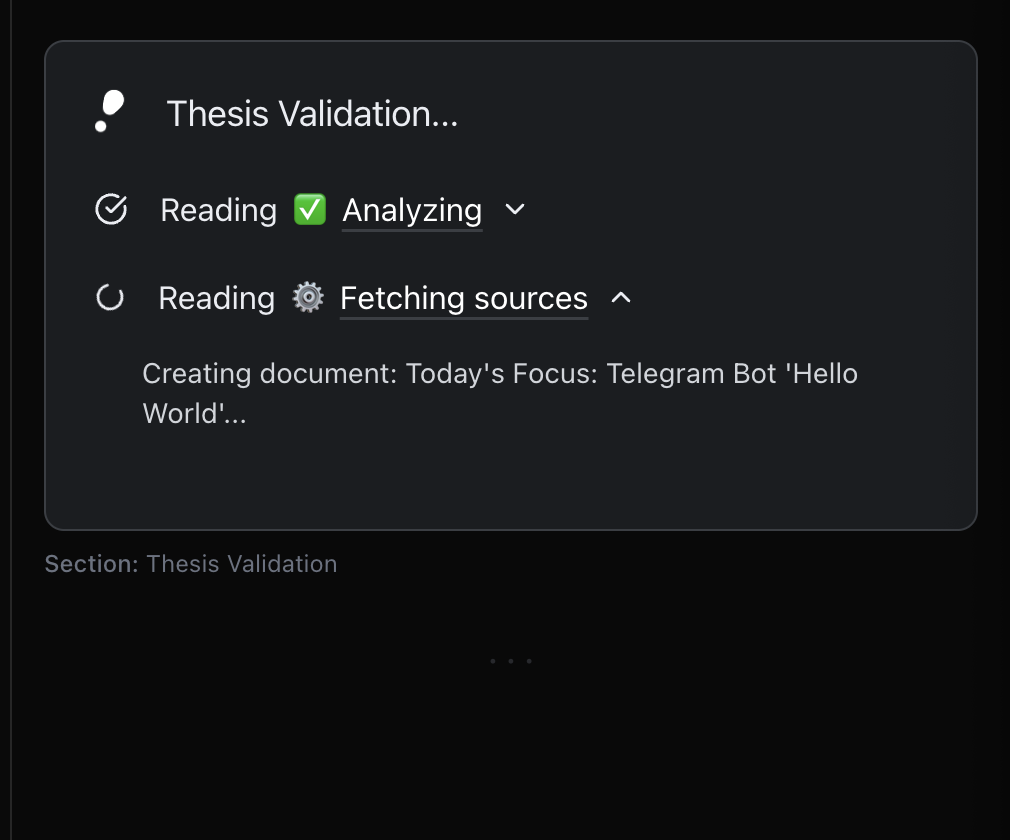
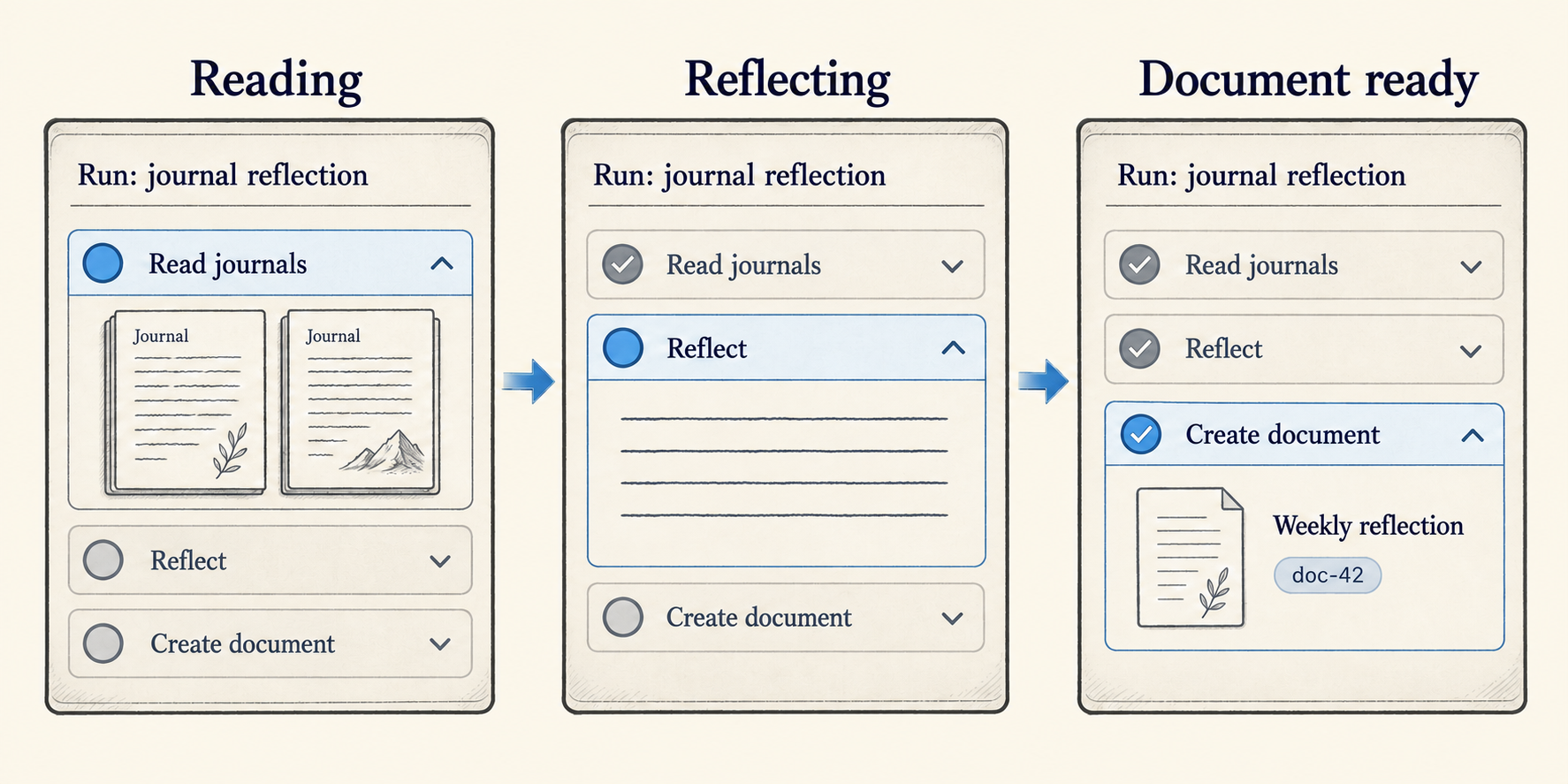
I connected an implementation to a demo executor before the new execution rules were complete. This gave us something to watch and discuss while developing the runtime. The animation and expandable contents made the experience tangible: we could consider what someone needed to see during a run, alongside what the executor needed to retain.
The design had three views of the same work. The editable page expressed the procedure. The movie showed a particular run. The generated document held its result. Keeping those roles distinct made it possible to explain what editing an instruction, inspecting an operation or opening an artifact was supposed to do.